
AI Lead Tracker CRM
A lightweight CRM dashboard for tracking leads, organising follow-ups, and managing the sales pipeline — built for freelancers and small teams who don't need a full Salesforce-style platform.
Project summary
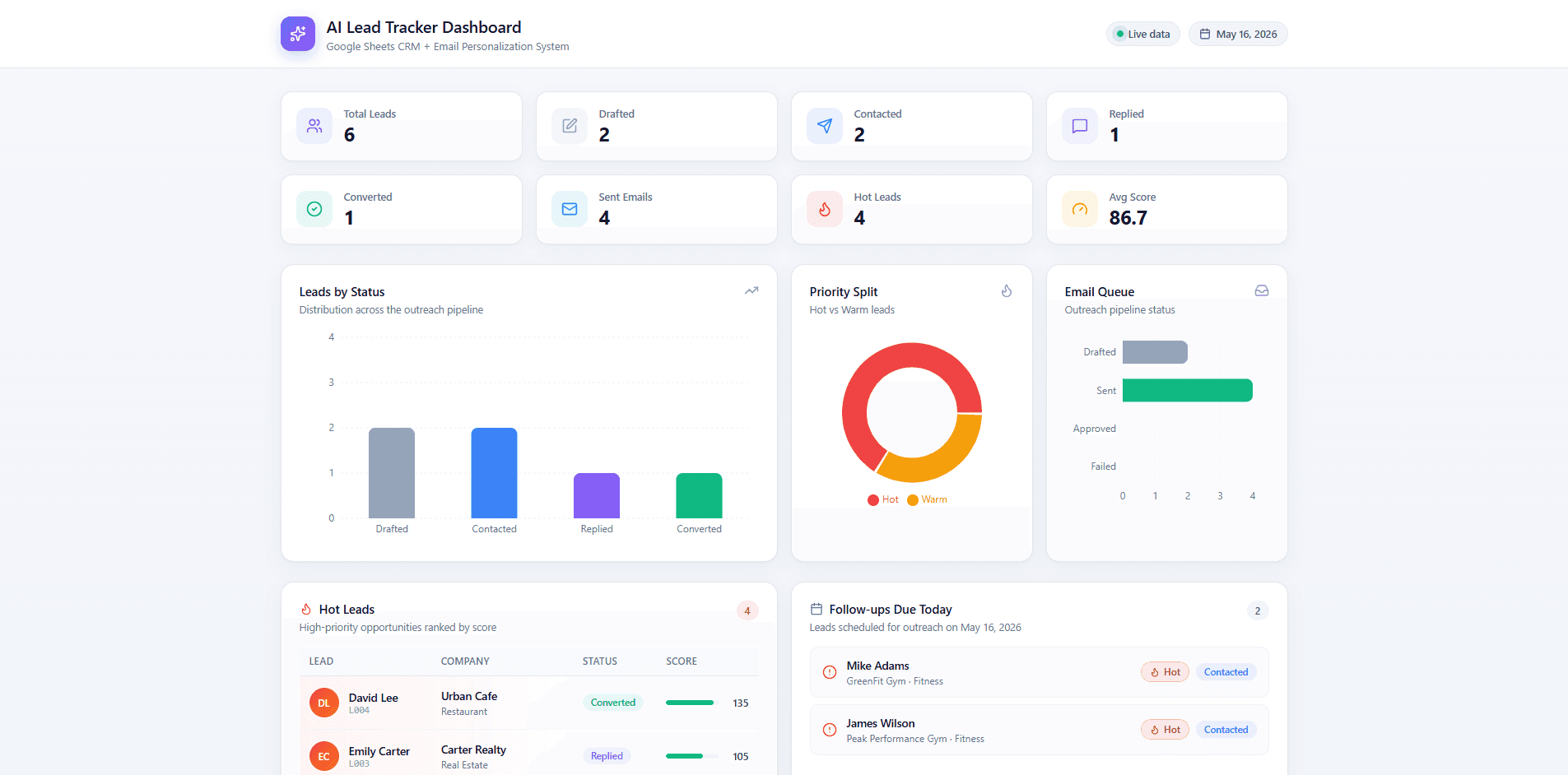
AI Lead Tracker CRM is a focused CRM dashboard that lets a freelancer or small team capture leads, update their status across the sales pipeline, log notes, and search and filter records — all from one clean interface.
What was broken
Freelancers and small businesses often track potential clients across notes apps, spreadsheets, messages, and inboxes. Without one place to see the pipeline, follow-ups slip and opportunities go cold. Existing CRMs are usually too heavy for a team of one or two people.
What I built
I built a streamlined CRM dashboard that focuses only on the core CRM workflow: add a lead, update its status, leave notes, and search the pipeline. The data structure is database-ready and can be backed by Google Sheets or a proper database depending on the user's setup.
What shipped
- Lead capture and structured records
- CRM-style dashboard with pipeline view
- Lead status workflow across the sales stages
- Search and filtering by name, status, and source
- Per-lead notes for follow-up context
- Follow-up tracking so nothing goes cold
- Responsive UI for desktop and mobile
- Google Sheets or database-ready data structure
What changed for the business
- Gives users one place to see every active lead and its current status.
- Makes follow-ups easier to plan because notes and status live alongside the lead record.
- Reduces the chance of forgetting a prospect that came in through email or chat.
- Provides a more professional client-facing operation for solo operators and small teams.
How it's built
- React + Tailwind CSS frontend for the dashboard and pipeline views.
- Data layer designed to plug into either Google Sheets (via Apps Script) or a Postgres-style database.
- Status workflow modelled as a small enum so pipeline stages stay consistent across views.
- Search and filter run client-side over the loaded lead set for snappy feedback.
- Deployed on Vercel with environment variables for the chosen data backend.
Why it matters
- Lets a freelancer manage the sales pipeline without paying for a full CRM platform.
- Reduces lost opportunities by giving every lead a status and notes in one place.
- Makes follow-ups easier to plan because the team can filter by status, not scroll through chats.
- Provides a starting point that scales from Google Sheets to a real database as the business grows.
Takeaways from the build
- Building around the CRM core (lead, status, note, follow-up) kept the scope small and the UI clean.
- Designing the data layer to support either Sheets or a database forced clean separation of concerns.
- Status enums beat free-text status fields — the pipeline view only works if everyone uses the same words.
- A responsive layout matters even for an internal tool, because most quick lookups happen on a phone.
Product in production

Let's talk about your version of this.
ServicePro Lead Engine
A full-stack lead capture and management system for service businesses — public contact form, Supabase-backed database, and a protected admin dashboard with status, notes, and CSV export.
Business Expense & Sales Dashboard
A founder-friendly dashboard for tracking daily sales and expenses, visualising profit, and exporting reports — built so a small business can stop running its books out of disconnected spreadsheets.